ClassicBox Games
ClassicBox Games Free Browser Games
  • Home
  • Thinking
  • Thi
  • Adventure
  • Rpg
  • Arcade
  • About
Sign In
Sign In
My Account Sign Out
Home Games Contact Sign In Account
All categories
Puzzle Adventure Arcade Classic Thinking Strategy Logic Family Casual Action Rpg Platformer Educational Retro Skill Racing Simulation Exploration family-friendly Trivia
  1. Home
  2. /
  3. Hetrik Letter Merge Puzzle
Back to Games

Hetrik Letter Merge Puzzle

Developer: Pixel Lord Dev
Published: 2024-11-12
Updated: 2026-06-27
Advertisement

Reviews

Hetrik offers a unique twist on classic puzzle games by combining Tetris block stacking with 2048 letter merging. The gameplay is easy to learn but requires strategic planning to keep the stack low. It runs smoothly in a browser for free, with full screen mode enhancing immersion. The letter-based progression adds a creative challenge that puzzle fans will enjoy.

Description

Game Introduction

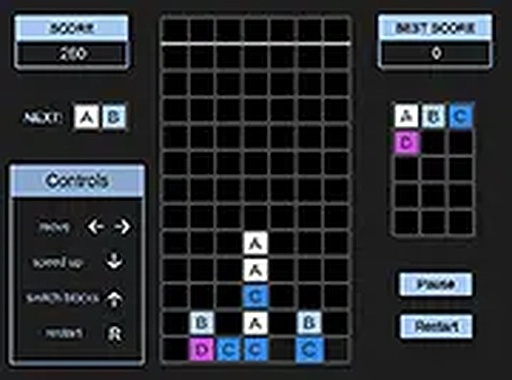
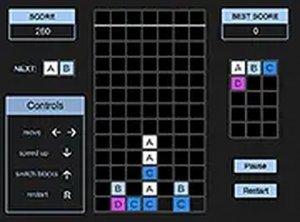
Hetrik is an arcade puzzle game that combines the falling block action of Tetris with the number merging concept of 2048, but uses letters instead of numbers. Players drop blocks featuring letters from the top of the screen and must arrange them so that matching letters touch. When two or more identical letters combine, they form a new letter, allowing for strategic progression. This unique crossover challenges both quick reflexes and careful planning. Hetrik runs directly in your browser on desktop computers and is free to play. With full screen mode available, you can fully immerse yourself in this creative puzzle adventure. Whether you enjoy classic Tetris or the merging puzzles of 2048, Hetrik offers a delightful new twist that keeps the gameplay fresh and engaging.

How to Play

To play Hetrik, use your keyboard or mouse on a desktop computer. Blocks with letters fall from the top of the screen, similar to Tetris. Your task is to arrange these blocks so that matching letters touch each other. When two or more identical letters combine, they form a new letter, just like in 2048. The game continues as you clear space and aim for higher letters. Plan your moves carefully to avoid stacking blocks to the top. Use arrow keys or mouse clicks to rotate and position blocks. The game ends when blocks reach the top, so think fast and match wisely. Hetrik is easy to learn but offers deep strategic fun.

Game Features

Game features include a unique Tetris and 2048 crossover with letter matching. It is free to play on desktop computers. Full screen mode provides an immersive experience. The game requires no download and runs directly in the browser.

Tips for Success

Focus on keeping your stack low by matching letters quickly. Plan ahead to create combos that clear multiple blocks at once. Prioritize matching letters that appear frequently to prevent the pile from rising. Take advantage of the full screen mode to reduce distractions. Practice regularly to improve your speed and strategic thinking.

Compatibility

This H5 game runs smoothly on:
• Desktop computers (Windows / Mac) • Mobile phones (iPhone / Android)
• Tablets (iPad / Android)
🌐 Best experienced with Chrome, Safari, or Edge
Faq
Can I play Hetrik on mobile devices?
Hetrik is designed for desktop computers and runs in a browser. It may not be optimized for mobile screens or touch controls, so a desktop or laptop with a keyboard or mouse is recommended for the best experience.
Is there a score or level system in Hetrik?
The game likely tracks your progress as you match letters and form new ones. While specific scoring details are not provided, players can aim to achieve higher letters and keep the stack from reaching the top to improve their performance.
How do I rotate blocks in Hetrik?
You can rotate blocks using arrow keys or mouse clicks on a desktop computer. The exact controls may vary, but typical puzzle games allow rotation to fit blocks into the desired position for matching letters.
Does Hetrik have any sound effects or music?
The game may include sound effects or music, but this is not specified in the available information. Players can expect a typical arcade puzzle experience, which often includes audio feedback for actions like matching letters or game over.
Can I pause the game in Hetrik?
Most browser-based puzzle games include a pause feature to allow players to take breaks. While not explicitly stated, Hetrik likely offers a way to pause the action, such as pressing a key or clicking a button, to plan your next move.
What happens when I form a new letter in Hetrik?
When two or more identical letters combine, they form a new letter, similar to the merging concept in 2048. This progression allows you to clear space and aim for higher letters, adding strategic depth to the gameplay.

Player Comments

💬

Sign in to comment

You must be logged in before posting a review or rating.

No account? Create one

U
💬

No comments yet. Be the first to comment!

Similar Titles

Ancient Civilization Puzzle Blocks

Ancient Civilization Puzzle Blocks

Santa Dash Holiday Arcade

Santa Dash Holiday Arcade

Bubble Pop Deluxe Puzzle

Bubble Pop Deluxe Puzzle

Symbol Match Guardian

Symbol Match Guardian

Table Tennis Puzzle Challenge

Table Tennis Puzzle Challenge

Analog Clock Puzzle Challenge

Analog Clock Puzzle Challenge

© 2026  ClassicBox Games All rights reserved.

Privacy Policy | Terms of Use | About | Contact | Disclaimer

Sign In My Account

Game Account

Please enter your username or email.
Please enter your password.
Please enter a username.
Please enter a valid email.
Password must be at least 6 characters.
Passwords do not match.
Hetrik Letter Merge Puzzle
Hetrik Letter Merge Puzzle Arcade
Hetrik Letter Merge Puzzle
Hetrik Letter Merge Puzzle Arcade

Tell us more

If you have any suggestions, please share them with us.