Fantasy Dragon Creator: Custom Design
Reviews
Description
Core Creative Process
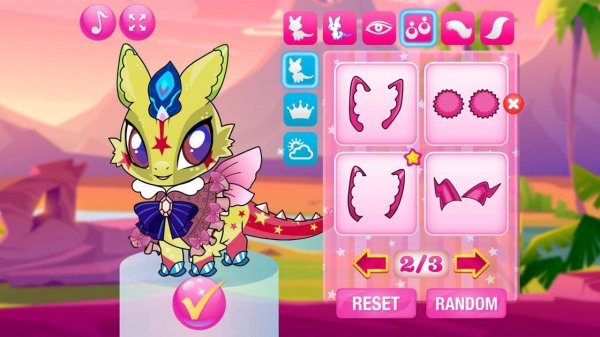
Players begin with a blank dragon template and select from a range of body shapes and sizes. The interface presents a color wheel with dozens of hues, allowing for precise shade selection. Patterns such as scales, spots, and gradients can be layered onto the dragon's body. Eye shapes and colors are chosen to give the creature a distinct personality, from playful to majestic. Wings come in several styles, including feathered, bat-like, and butterfly-inspired, each adjustable in size and color. The tail can be customized with spikes, fins, or a fluffy tip. Accessories like hats, bows, and collars add the final touches.
User Interface & Accessibility
The menu system is designed for ease of use, with drag-and-drop functionality that works on both desktop and mobile devices. Icons are large and clearly labeled, making navigation simple for younger players. A preview window shows the dragon in real-time as changes are made. The game includes an undo button and a reset option, allowing for experimentation without penalty. No timers or scores are present, reducing pressure and focusing the experience on creative exploration.
Visual Style & Atmosphere
The art direction emphasizes bright, saturated colors and friendly character designs. Backgrounds feature soft gradients and subtle animations, such as floating clouds or twinkling stars, creating a calm environment. The dragons themselves have rounded shapes and expressive features, avoiding any scary or intense elements. The overall aesthetic is cheerful and inviting, suitable for young children and adults alike. The game's palette is inclusive, with options for pastels, neons, and earth tones.
Sharing & Community Features
Once a dragon is complete, players can save their creation as an image file. The game provides a built-in sharing option that allows users to post their dragon to a moderated gallery. Other players can view and like creations, but there is no chat or direct messaging to ensure safety. The gallery is organized by popularity and recent submissions, offering inspiration for new designs. Players can also export their dragon as a wallpaper or avatar for use outside the game.
Educational & Developmental Value
This game supports color theory learning through experimentation with complementary and contrasting colors. Pattern recognition is enhanced as players mix and match textures. Decision-making skills are exercised when choosing between different wing styles or accessory combinations. The open-ended nature of the design process encourages problem-solving and creative thinking. No reading is required for basic use, making it accessible to pre-literate children. The game also introduces basic concepts of symmetry and balance in visual design.


Player Comments
Sign in to comment
You must be logged in before posting a review or rating.
No account? Create one
No comments yet. Be the first to comment!