
Lane Control Reflex: Isometric Arcade
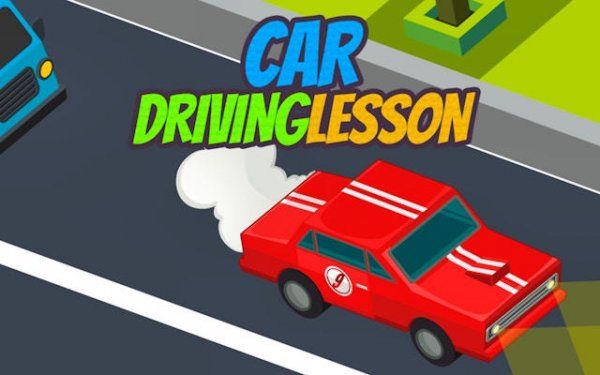
Lane Control Reflex places you behind the wheel in a busy isometric world. Your goal is simple: steer through moving traffic without stopping. Each second you survive adds to your score, rewarding steady hands and sharp eyes.
Reviews
A clean, focused arcade experience that rewards patience and precision. The isometric view and simple controls make traffic navigation addictive.
About this game
Visual Perspective and Road Layout
The isometric viewpoint gives a clear top-down angle on the road ahead. This fixed camera angle helps you judge distances between your vehicle and others. The road layout is straightforward, with multiple lanes for you to navigate. Traffic flows in a consistent pattern, allowing you to learn and adapt over time. The visual style is clean and uncluttered, so you can focus entirely on the movement around you.
Core Control Scheme
Controls are streamlined to one essential action: changing lanes. There are no pedals for speed or braking. On a keyboard, directional keys move your car left or right. On a touchscreen, simple swipes or taps achieve the same result. This simplicity lowers the barrier to entry, letting anyone start playing immediately. The challenge comes from timing your moves correctly as traffic density shifts.
Traffic Patterns and Difficulty Curve
Traffic does not remain static. Early rounds feature sparse vehicles with generous gaps. As your driving time increases, more cars appear and move at varying speeds. Some vehicles may change lanes, requiring you to anticipate their path. The difficulty ramps up gradually, giving you room to build confidence before facing denser traffic. This curve keeps the experience fresh without feeling unfair.
Score System and Motivation
Your score is a direct measure of how long you avoid collisions. Every fraction of a second contributes to your total. There are no multipliers or bonus items to distract you. The score serves as a clear benchmark for improvement. You can compare your best runs against your own records, which encourages repeated attempts. The minimalist interface displays your current score and best score, keeping the focus on the road.
Cross-Device Compatibility
Built with HTML5, this game runs smoothly on desktop browsers and mobile devices alike. The controls adapt to each platform without losing responsiveness. On a phone, the touch interface feels natural and immediate. On a computer, keyboard inputs are precise. This flexibility means you can practice on any device and maintain the same level of performance.
Strategies for Consistent Improvement
Success depends on pattern recognition and calm decision-making. Watch the flow of traffic ahead rather than reacting to the car directly in front. Identify gaps early and commit to a lane change smoothly. As speed increases, resist the urge to make frantic movements. Small, deliberate adjustments are more effective than rapid, erratic steering. Regular short sessions help build muscle memory for lane positioning.









Comments
0 comments